
気軽に質問できるチャンネルが欲しい、いつもクールを装っているが本当はくだらないダジャレを言いたい… そんなときは Slack App で匿名投稿機能を実現させましょう。
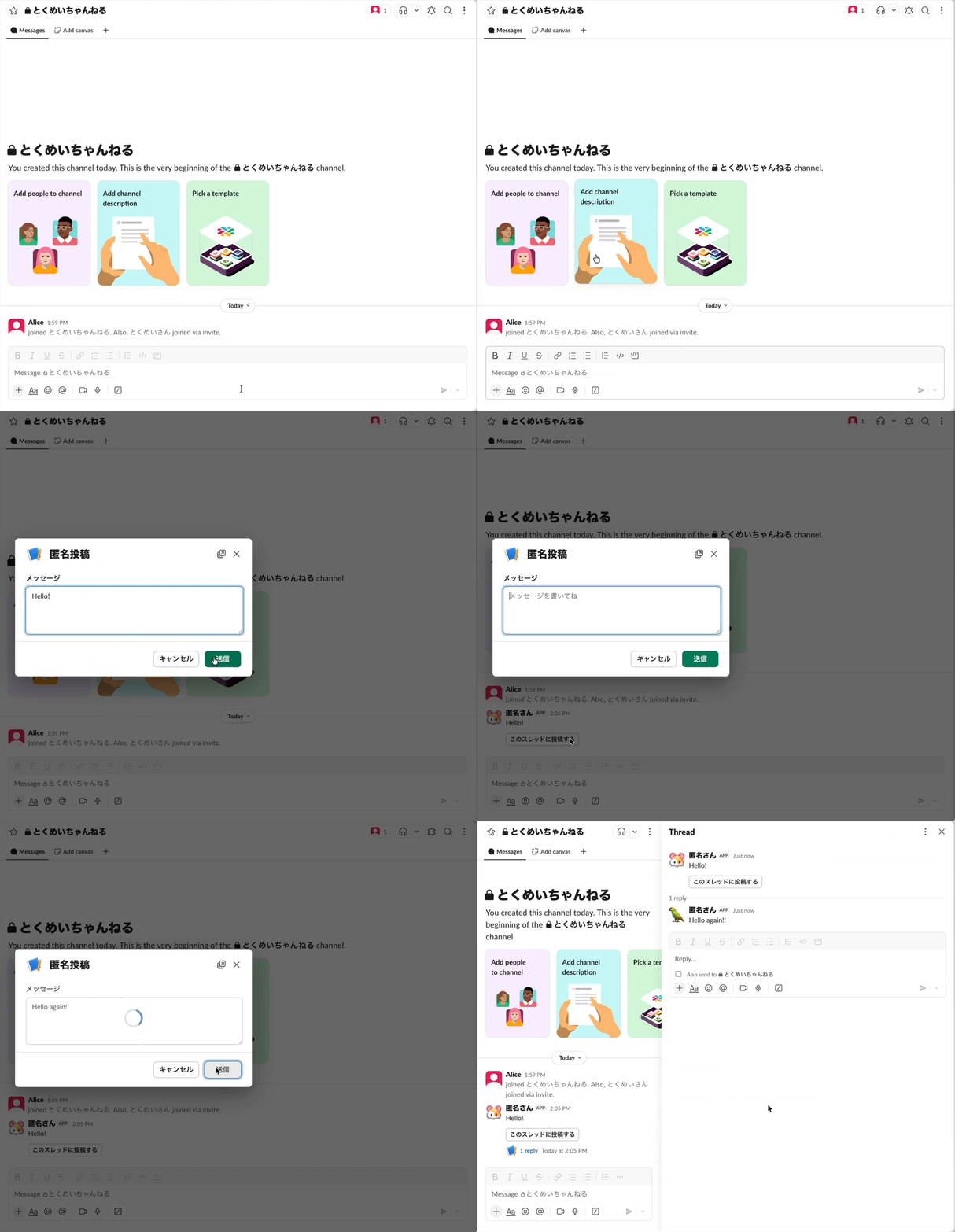
では、早速作りましょう!
1. Cloudflare Workers の作成 #
ローカルに TypeScript ファイルを作ります。(例:main.ts)を作成し、以下のコードをコピペします。その後 npx esbuild main.ts --outfile=main.js コマンドを実行して ESBuild で JavaScript にトランスパイルしましょう。
/**
 * Anonymous post Slack App running on Cloudflare Workers
 *
 * Use cases:
 * - Trigger global shortcut -> Open modal -> Write message and submit -> Post message with a reply button to a channel as bot
 * - Click a reply button -> Open modal for thread reply -> Post message into the thread as bot
 *
 * Required Slack App Permissions:
 * - commands
 * - chat:write
 * - chat:write.customize
 *
 * Required Environment variables:
 * - SLACK_CHANNEL_ID: The cannel ID a bot post message to
 * - SLACK_SIGNING_SECRET: Slack App signing secret
 * - SLACK_BOT_TOKEN: Slack App bot OAuth token
 */

type Env = {
  SLACK_CHANNEL_ID: string;
  SLACK_SIGNING_SECRET: string;
  SLACK_BOT_TOKEN: string;
};

type Ctx = any;

type SlackShortcutPayload = {
  type: "shortcut";
  trigger_id: string;
};

type SlackViewSubmissionPayload = {
  type: "view_submission";
  view: {
    private_metadata: string;
    state: {
      values: {
        message_block: {
          message_input: {
            value: string;
          };
        };
      };
    };
  };
};

type SlackBlockActionsPayload = {
  type: "block_actions";
  trigger_id: string;
  message: {
    ts: string;
  };
};

type SlackPayload =
  | SlackShortcutPayload
  | SlackViewSubmissionPayload
  | SlackBlockActionsPayload;

type ModalMetadata =
  | { mode: "new"; timestamp: null }
  | { mode: "reply"; timestamp: string };

export default {
  async fetch(request: Request, env: Env, ctx: Ctx): Promise<Response> {
    return main(request, env, ctx);
  },
};

async function main(request: Request, env: Env, ctx: Ctx): Promise<Response> {
  // ---------------------------------------------------------------------------
  // Validate environment variables
  // ---------------------------------------------------------------------------
  const requiredEnvKeys = [
    "SLACK_CHANNEL_ID",
    "SLACK_SIGNING_SECRET",
    "SLACK_BOT_TOKEN",
  ] as const;
  for (const key of requiredEnvKeys) {
    const value = env[key];
    if (value == null || value === "") {
      log.error(`Environment variable ${key} is not set or empty`);
      return new Response("Internal Server Error", { status: 500 });
    }
  }

  // ---------------------------------------------------------------------------
  // Validate request
  // ---------------------------------------------------------------------------
  if (request.method !== "POST") {
    log.error(`Requested method is ${request.method}`);
    return new Response("Method Not Allowed", { status: 405 });
  }

  const contentType = request.headers.get("content-type") ?? "";
  if (!contentType.includes("application/x-www-form-urlencoded")) {
    log.error(`Content type is ${contentType}`);
    return new Response("Unsupported Content-Type", { status: 415 });
  }

  if (!(await verifySlackSignature(request, env))) {
    log.error("Could not verify Slack signature");
    return new Response("Unauthorized", { status: 401 });
  }

  const rawBody = await request.clone().text();
  const form = new URLSearchParams(rawBody);
  const payloadString = form.get("payload");
  if (!payloadString) {
    return new Response("Unprocessable Content", { status: 422 });
  }

  // ---------------------------------------------------------------------------
  // Main logic
  // ---------------------------------------------------------------------------
  const payload = JSON.parse(payloadString) as SlackPayload;
  log.info("Main process started");

  switch (payload.type) {
    // When triggering global shortcut
    case "shortcut":
      return handleShortcutEvent(payload, env);
    // When submitting modal form
    case "view_submission":
      return handleViewSubmissionEvent(payload, env, ctx);
    // When clicking reply button
    case "block_actions":
      return handleBlockActionsEvent(payload, env);
    default:
      return new Response("", { status: 200 });
  }
}

async function handleShortcutEvent(
  payload: SlackShortcutPayload,
  env: Env,
): Promise<Response> {
  await openModal(env.SLACK_BOT_TOKEN, payload.trigger_id, {
    mode: "new",
    timestamp: null,
  });
  return new Response("", { status: 200 });
}

async function handleViewSubmissionEvent(
  payload: SlackViewSubmissionPayload,
  env: Env,
  ctx: Ctx,
): Promise<Response> {
  const message = payload.view.state.values.message_block.message_input.value;
  const metadata = JSON.parse(payload.view.private_metadata) as ModalMetadata;

  switch (metadata.mode) {
    case "new":
      ctx.waitUntil(
        postMessage(env.SLACK_BOT_TOKEN, env.SLACK_CHANNEL_ID, message, {
          threadTimestamp: null,
          includeReplyButton: true,
        }),
      );
      break;
    case "reply":
      ctx.waitUntil(
        postMessage(env.SLACK_BOT_TOKEN, env.SLACK_CHANNEL_ID, message, {
          threadTimestamp: metadata.timestamp,
          includeReplyButton: false,
        }),
      );
      break;
  }

  return new Response(JSON.stringify({ response_action: "clear" }), {
    status: 200,
    headers: { "Content-Type": "application/json; charset=utf-8" },
  });
}

async function handleBlockActionsEvent(
  payload: SlackBlockActionsPayload,
  env: Env,
): Promise<Response> {
  await openModal(env.SLACK_BOT_TOKEN, payload.trigger_id, {
    mode: "reply",
    timestamp: payload.message.ts,
  });
  return new Response("", { status: 200 });
}

/**
 * Open modal.
 */
async function openModal(
  token: string,
  triggerId: string,
  metadata: ModalMetadata,
): Promise<void> {
  const view = {
    type: "modal",
    private_metadata: JSON.stringify({
      mode: metadata.mode,
      timestamp: metadata.timestamp,
    }),
    title: { type: "plain_text", text: "匿名投稿" },
    submit: { type: "plain_text", text: "送信" },
    close: { type: "plain_text", text: "キャンセル" },
    blocks: [
      {
        type: "input",
        block_id: "message_block",
        label: { type: "plain_text", text: "メッセージ" },
        element: {
          type: "plain_text_input",
          action_id: "message_input",
          multiline: true,
          placeholder: { type: "plain_text", text: "メッセージを書いてね" },
        },
      },
    ],
  };
  await fetch("https://slack.com/api/views.open", {
    method: "POST",
    headers: {
      Authorization: `Bearer ${token}`,
      "Content-Type": "application/json; charset=utf-8",
    },
    body: JSON.stringify({ view, trigger_id: triggerId }),
  });
}

/**
 * Post message.
 */
async function postMessage(
  token: string,
  channelId: string,
  text: string,
  option: {
    threadTimestamp: string | null;
    includeReplyButton: boolean;
  },
): Promise<void> {
  const iconEmojis = [
    ":monkey_face:",
    ":gorilla:",
    ":orangutan:",
    ":dog:",
    ":poodle:",
    ":wolf:",
    ":fox_face:",
    ":cat:",
    ":lion_face:",
    ":tiger:",
    ":horse:",
    ":unicorn_face:",
    ":zebra_face:",
    ":deer:",
    ":cow:",
    ":pig:",
    ":ram:",
    ":sheep:",
    ":goat:",
    ":dromedary_camel:",
    ":camel:",
    ":llama:",
    ":giraffe_face:",
    ":elephant:",
    ":rhinoceros:",
    ":hippopotamus:",
    ":mouse:",
    ":hamster:",
    ":rabbit:",
    ":chipmunk:",
    ":hedgehog:",
    ":bear:",
    ":polar_bear:",
    ":koala:",
    ":panda_face:",
    ":sloth:",
    ":otter:",
    ":kangaroo:",
    ":chicken:",
    ":baby_chick:",
    ":bird:",
    ":penguin:",
    ":dove_of_peace:",
    ":eagle:",
    ":duck:",
    ":swan:",
    ":owl:",
    ":dodo:",
    ":flamingo:",
    ":peacock:",
    ":parrot:",
    ":frog:",
    ":turtle:",
    ":dragon_face:",
    ":t-rex:",
    ":whale:",
    ":dolphin:",
  ];
  const iconEmoji = iconEmojis[Math.floor(Math.random() * iconEmojis.length)];

  const blockBase = [{ type: "section", text: { type: "mrkdwn", text } }];
  const blocks = option.includeReplyButton
    ? [
        ...blockBase,
        {
          type: "actions",
          elements: [
            {
              type: "button",
              action_id: "open_thread_reply_modal",
              text: {
                type: "plain_text",
                text: "このスレッドに投稿する",
                emoji: true,
              },
              value: "open",
            },
          ],
        },
      ]
    : blockBase;

  await fetch("https://slack.com/api/chat.postMessage", {
    method: "POST",
    headers: {
      Authorization: `Bearer ${token}`,
      "Content-Type": "application/json; charset=utf-8",
    },
    body: JSON.stringify({
      channel: channelId,
      thread_ts: option.threadTimestamp,
      username: "匿名さん",
      icon_emoji: iconEmoji,
      blocks: blocks,
    }),
  });
}

/**
 * Verify a Slack request signature using the signing secret and request body.
 * Rejects requests older or newer than 5 minutes to prevent replay attacks.
 * Returns true only if the signature and timestamp are valid.
 */
async function verifySlackSignature(
  request: Request,
  env: Env,
): Promise<boolean> {
  const timestamp = request.headers.get("x-slack-request-timestamp");
  const signature = request.headers.get("x-slack-signature");
  if (!timestamp || !signature) {
    return false;
  }
  const now = Math.floor(Date.now() / 1000);
  if (Math.abs(now - Number(timestamp)) > 60 * 5) {
    return false;
  }
  const rawBody = await request.clone().text();
  const base = `v0:${timestamp}:${rawBody}`;
  const expected = `v0=${await hmacSha256Hex(base, env.SLACK_SIGNING_SECRET)}`;
  return timingSafeEqual(expected, signature);
}

/**
 * Compute an HMAC-SHA256 signature and return it as a hexadecimal string.
 * Generates an HMAC using SHA-256 with the given secret key and message, then encodes the result as a lowercase hexadecimal string.
 * This logic is used to verify Slack request signatures.
 */
async function hmacSha256Hex(message: string, key: string): Promise<string> {
  const encoder = new TextEncoder();
  const cryptoKey = await crypto.subtle.importKey(
    "raw",
    encoder.encode(key),
    { name: "HMAC", hash: "SHA-256" },
    false,
    ["sign"],
  );
  const mac = await crypto.subtle.sign(
    "HMAC",
    cryptoKey,
    encoder.encode(message),
  );
  return [...new Uint8Array(mac)]
    .map((b) => b.toString(16).padStart(2, "0"))
    .join("");
}

/**
 * Compare two strings in constant time to prevent timing attacks.
 * c.f. Node.js crypto.timingSafeEqual - https://nodejs.org/api/crypto.html#cryptotimingsafeequala-b
 */
function timingSafeEqual(a: string, b: string): boolean {
  const encoder = new TextEncoder();
  const ba = encoder.encode(a);
  const bb = encoder.encode(b);
  if (ba.length !== bb.length) {
    return false;
  }
  let diff = 0;
  for (let i = 0; i < ba.length; i++) {
    diff |= ba[i] ^ bb[i];
  }
  return diff === 0;
}

const log = {
  info: (obj: unknown) => console.info(`INFO: ${String(obj)}`),
  error: (obj: unknown) => console.error(`ERROR: ${String(obj)}`),
};
Cloudflare のダッシュボード(https://dash.cloudflare.com/)から Cloudflare Workers の新しいアプリを作成しましょう。
その後、コード中で必要となる3つの環境変数を登録 …
SLACK_CHANNEL_ID
SLACK_SIGNING_SECRET
SLACK_BOT_TOKEN
… したいのですが、これは Slack App 作成しないと取得できない値なのでまた後ほどやりましょう。
2. Slack App の作成 #
ざっくり箇条書きでいきます。以前に投稿した記事で Slack App の作成方法を詳細に説明しています。必要でしたらそちらを参照ください。
- https://api.slack.com/apps から新しいアプリを作成
- Interactivity & Shortcuts を開く
- On にする
- Request URL に Cloudflare Workers の URL を設定する
- Create New Shortcut からショートカットを作成する
- OAuth & Permissions を開く
- Bot Token Scopes に以下権限を設定
commandschat:writechat:write.customize
- Bot Token Scopes に以下権限を設定
- App Home を開く
- App Display Name を設定する
- OAuth & Permissions を開く
- ワークスペースにインストールする
3. Cloudflare Workers の環境変数を設定 #
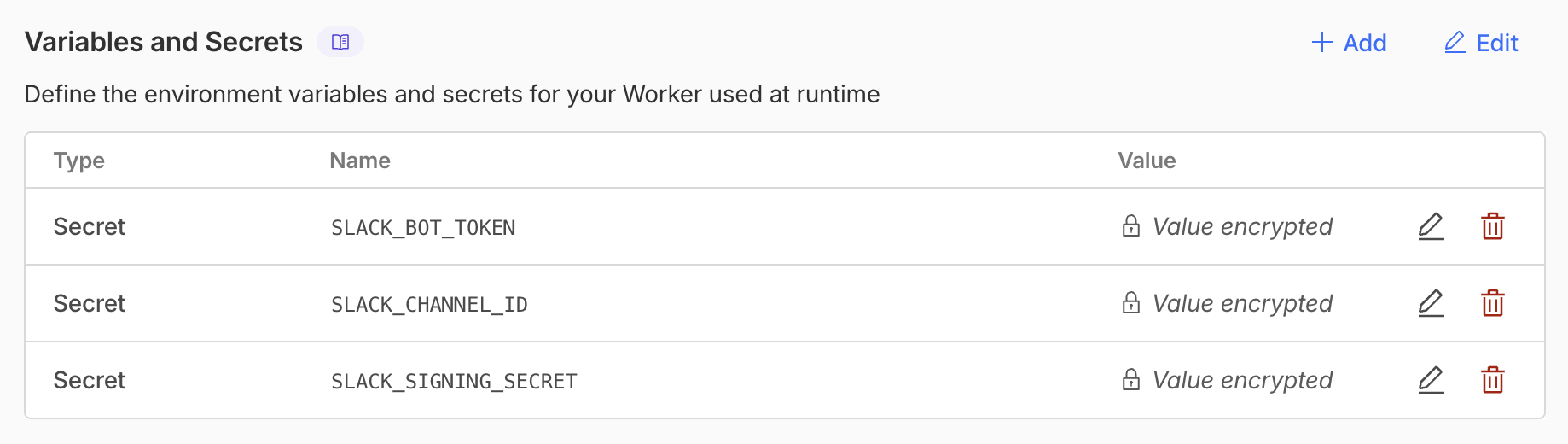
さきほど後回しにした作業をやりましょう。Cloudflare Workers に環境変数を設定します。
SLACK_CHANNEL_ID:匿名アプリを動作させたいチャンネルの ID を設定SLACK_SIGNING_SECRET:Slack App の Signing Secret を設定SLACK_BOT_TOKEN:Slack App の Bot User OAuth Token を設定
4. Slack チャンネルに Slack App を追加 #
Slack を開き、チャンネル設定のところから作成したアプリを追加しましょう。
5. 動作確認 #
本記事冒頭に貼ったように動作すれば成功です!