
フロントエンドアーキテクチャに対するわたしの知識は MVVM で止まっていましたが、最近は MVI が主流(?)ということを見聞きしました。MVI って何? MVVM とどう違うの? となったので覚え書きです。
そのまえに、MVVM(Model-View-ViewModel)とは? #
Wikipedia の記事がちょうどよい文量でわかりやすいです。
- Model View ViewModel - Wikipedia
- https://ja.wikipedia.org/wiki/Model_View_ViewModel
View(UI 担当)、Model(データやビジネスロジック担当)、ViewModel(View と Model の仲介担当)の 3 つのコンポーネントから構成されます。
View <-> ViewModel <-> Model
View と Model を明示的に分離する(プレゼンテーションとドメインの分離)ために、View のためのモデル(model for a view)として ViewModel を導入したのが特徴です。ViewModel は View を描画するための状態の保持と、View から受け取った入力を適切な形に変換して Model に伝達する役割を担います。
で、MVI(Model-View-Intent)とは? #
MVI は MVVM に対していくつかのルールを追加したものです。MVI は MVVM の部分集合で、ベン図でいうと MVVM という円の中に MVI が含まれるイメージです。
MVI では ViewModel をこのように実装しなさい、というルールがあります。
- 1.状態(State)は単一にする
- ViewModel の保持する状態は ひとつの State オブジェクトに集約します。
- 2.ユーザー操作は Intent として扱う
- ボタンが押された、リロードされた、など「ユーザーが何をしたいか」を Intent として ViewModel に渡します。
- 3.データの流れは単方向(Unidirectional Data Flow)
- View から Intent を ViewModel に渡し、ViewModel は Intent を処理して新しい State を生成し、View に反映させる、という流れを守ります。
View -> Intent -> ViewModel -> State -> View - 「状態(State)は単一にする」と「ユーザー操作は Intent として扱う」を遵守すると、自然とデータの流れは単方向になります。
- View から Intent を ViewModel に渡し、ViewModel は Intent を処理して新しい State を生成し、View に反映させる、という流れを守ります。
そんなこと言われなくてももうやっているよ、という人もいるかもしれません。意図的に MVI に取り組もうとしていなくとも、自分なりにきれいな MVVM を実装しようとすると、自然と MVI ができあがっていた、ということもありそうです。
MVI の具体例(Flutter コード) #
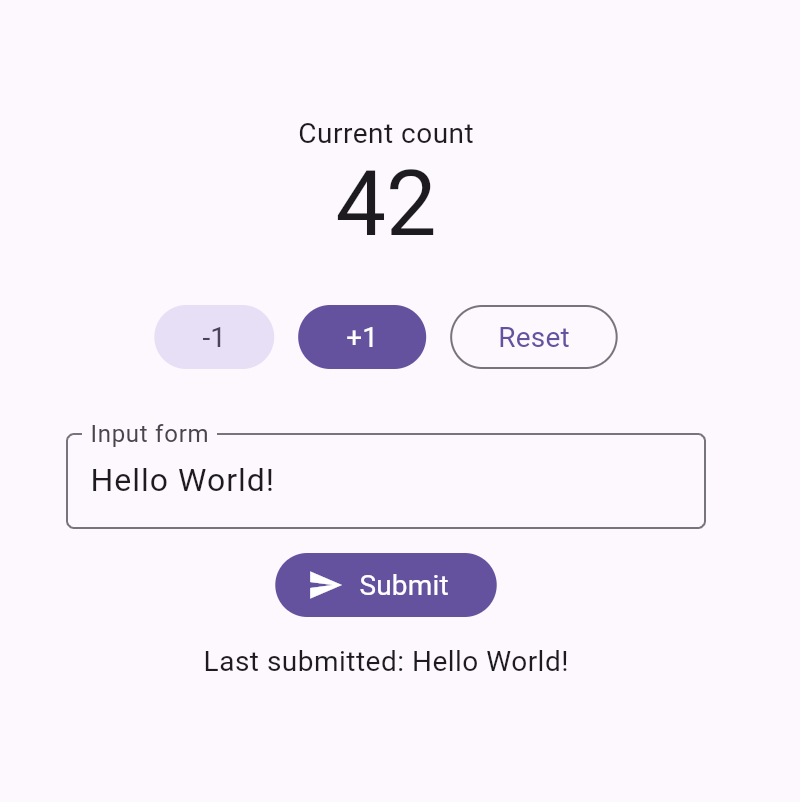
main.dart
import 'package:flutter/material.dart';

import 'view.dart';

void main() {
  runApp(const MyApp());
}

class MyApp extends StatelessWidget {
  const MyApp({super.key});

  @override
  Widget build(BuildContext context) {
    return MaterialApp(home: const MyPage());
  }
}
view_model.dart
import 'package:flutter/material.dart';

// -----------------------------------------------------------------------------
// State
// -----------------------------------------------------------------------------
class MyState {
  const MyState({this.count = 0, this.inputText = '', this.submittedText = ''});

  final int count;
  final String inputText;
  final String submittedText;

  MyState copyWith({int? count, String? inputText, String? submittedText}) {
    return MyState(
      count: count ?? this.count,
      inputText: inputText ?? this.inputText,
      submittedText: submittedText ?? this.submittedText,
    );
  }
}

// -----------------------------------------------------------------------------
// Intent
// -----------------------------------------------------------------------------
sealed class MyIntent {
  const MyIntent();

  const factory MyIntent.increment() = _MyIntentIncrement;
  const factory MyIntent.decrement() = _MyIntentDecrement;
  const factory MyIntent.reset() = _MyIntentReset;
  const factory MyIntent.input(String value) = _MyIntentInput;
  const factory MyIntent.submit() = _MyIntentSubmit;
}

class _MyIntentIncrement extends MyIntent {
  const _MyIntentIncrement();
}

class _MyIntentDecrement extends MyIntent {
  const _MyIntentDecrement();
}

class _MyIntentReset extends MyIntent {
  const _MyIntentReset();
}

class _MyIntentInput extends MyIntent {
  const _MyIntentInput(this.value);
  final String value;
}

class _MyIntentSubmit extends MyIntent {
  const _MyIntentSubmit();
}

// -----------------------------------------------------------------------------
// ViewModel
// -----------------------------------------------------------------------------
class MyViewModel extends ChangeNotifier {
  MyState _state = const MyState();

  MyState get state => _state;

  void dispatch(MyIntent intent) {
    switch (intent) {
      case _MyIntentIncrement():
        _onIncrement();
      case _MyIntentDecrement():
        _onDecrement();
      case _MyIntentReset():
        _onReset();
      case _MyIntentInput(:final value):
        _onInput(value);
      case _MyIntentSubmit():
        _onSubmit();
    }
    notifyListeners();
  }

  void _onIncrement() {
    _state = _state.copyWith(count: _state.count + 1);
  }

  void _onDecrement() {
    _state = _state.copyWith(count: _state.count - 1);
  }

  void _onReset() {
    _state = _state.copyWith(count: 0);
  }

  void _onInput(String value) {
    _state = _state.copyWith(inputText: value);
  }

  void _onSubmit() {
    final trimmed = _state.inputText.trim();
    if (trimmed.isEmpty) {
      return;
    }
    _state = _state.copyWith(submittedText: trimmed);
  }
}
view.dart
import 'package:flutter/material.dart';

import 'view_model.dart';

class MyPage extends StatefulWidget {
  const MyPage({super.key});

  @override
  State<MyPage> createState() => _MyPageState();
}

class _MyPageState extends State<MyPage> {
  late final MyViewModel _viewModel;

  @override
  void initState() {
    super.initState();
    _viewModel = MyViewModel();
  }

  @override
  void dispose() {
    _viewModel.dispose();
    super.dispose();
  }

  @override
  Widget build(BuildContext context) {
    return ListenableBuilder(
      listenable: _viewModel,
      builder: (context, _) {
        return MyView(state: _viewModel.state, onIntent: _viewModel.dispatch);
      },
    );
  }
}

class MyView extends StatelessWidget {
  const MyView({super.key, required this.state, required this.onIntent});

  final MyState state;
  final ValueChanged<MyIntent> onIntent;

  @override
  Widget build(BuildContext context) {
    return Scaffold(
      body: Center(
        child: Column(
          mainAxisSize: MainAxisSize.min,
          children: [
            const Text('Current count'),
            Text(
              '${state.count}',
              style: Theme.of(context).textTheme.displayMedium,
            ),
            const SizedBox(height: 24),
            Row(
              mainAxisAlignment: MainAxisAlignment.center,
              children: [
                FilledButton.tonal(
                  onPressed: () => onIntent(const MyIntent.decrement()),
                  child: const Text('-1'),
                ),
                const SizedBox(width: 12),
                FilledButton(
                  onPressed: () => onIntent(const MyIntent.increment()),
                  child: const Text('+1'),
                ),
                const SizedBox(width: 12),
                OutlinedButton(
                  onPressed: () => onIntent(const MyIntent.reset()),
                  child: const Text('Reset'),
                ),
              ],
            ),
            const SizedBox(height: 32),
            ConstrainedBox(
              constraints: const BoxConstraints(maxWidth: 320),
              child: TextField(
                decoration: const InputDecoration(
                  labelText: 'Input form',
                  border: OutlineInputBorder(),
                ),
                onChanged: (value) {
                  onIntent(MyIntent.input(value));
                },
                onSubmitted: (_) {
                  onIntent(const MyIntent.submit());
                },
              ),
            ),
            const SizedBox(height: 12),
            FilledButton.icon(
              onPressed: () => onIntent(const MyIntent.submit()),
              icon: const Icon(Icons.send),
              label: const Text('Submit'),
            ),
            const SizedBox(height: 12),
            Text('Last submitted: ${state.submittedText}'),
          ],
        ),
      ),
    );
  }
}
MVI で Intent を介するメリット #
人によっては Intent を介するスタイルが冗長に感じるかもしれません。ViewModel に操作用のパブリックメソッドを複数持たせ、View が直接それを呼び出すのではなく、あえて Intent を介して ViewModel に操作を伝えるスタイルの利点はなんでしょうか?
いくつか考えられますが、最も大きい恩恵はテストのしやすさではないかと思います。Intent を介する形にしておくことで、以下のようにテストがシンプルになります。
- ViewModel のテスト
- 特定の Intent を ViewModel に渡したときに、期待される State に遷移するかテストすれば OK
- View のテスト
- 特定のユーザー操作をしたときに、期待される Intent が onIntent に渡るかテストすれば OK